Deliveries
Every parcel reaches its person.
Couriers log parcels on their own phone, from the QR code already at your door. A photo of the label fills in the name. The person it's for is told by email, Slack, the GuestTrack app or a text, and says what to do with it. Nothing waits forgotten in the mail room.
No app for couriers. No account for the people parcels are for.
How it works, in four steps
From the courier at the door to the parcel in the right hands.
The courier
Scans the QR code at the door
Your check-in page asks “Delivering a parcel?”. No new poster to print, no form to fill in.
The label
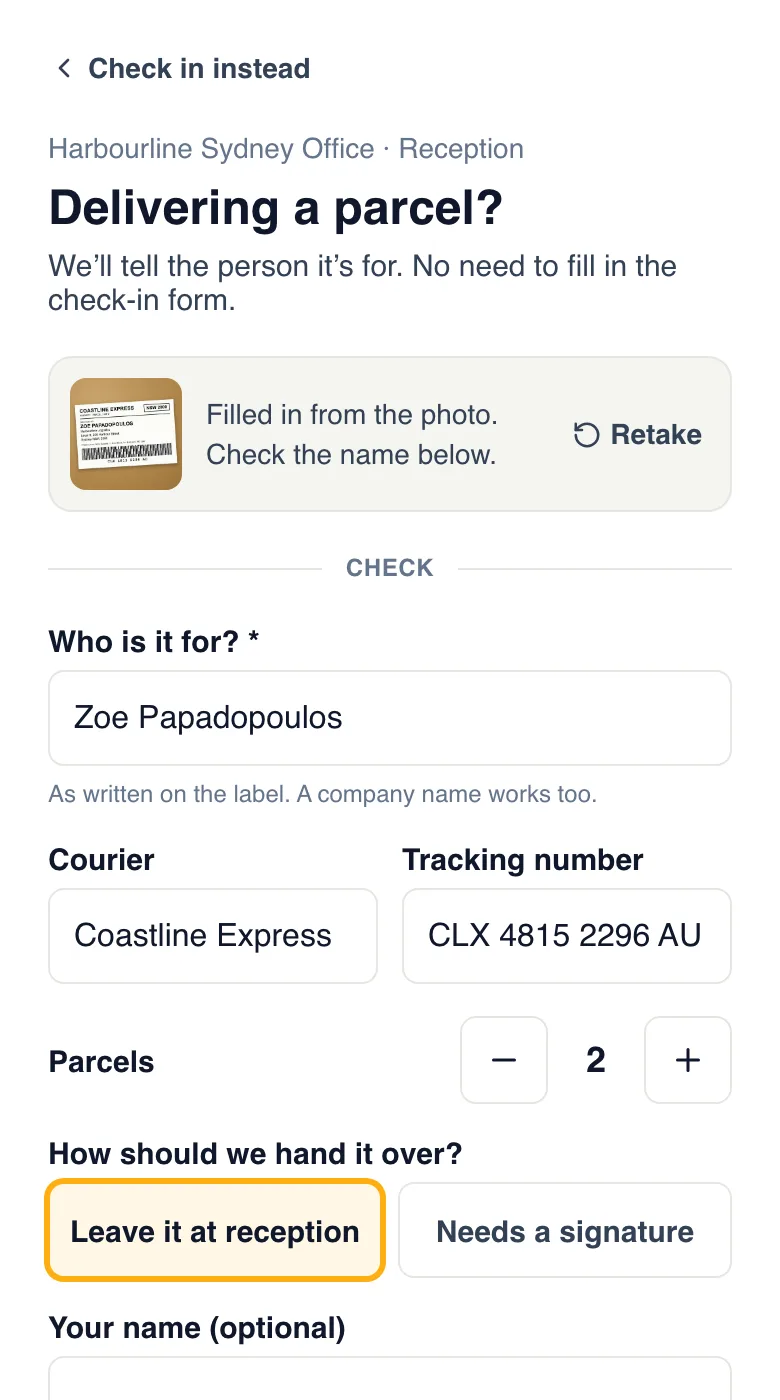
One photo fills it in
The name, the courier, the tracking number and how many parcels. The courier checks the name and taps Log the delivery.
The person it’s for
Is told at once
By email and Slack, in the GuestTrack app, or by text. The courier sees “Zoe P. has been told” and goes.
Them, or reception
Say what happens next
I’m coming down for it, Leave it at reception, or Someone else will. Reception marks it collected.
A name that matches nobody? Your front desk is told instead, and picks the right person on Today. No parcel is left without someone who knows about it.
Watch it set up, start to finish
A new project for an office, its people and the front door. Then two couriers: one leaves two parcels, one needs a signature. Three minutes.
Two parcels for Zoe
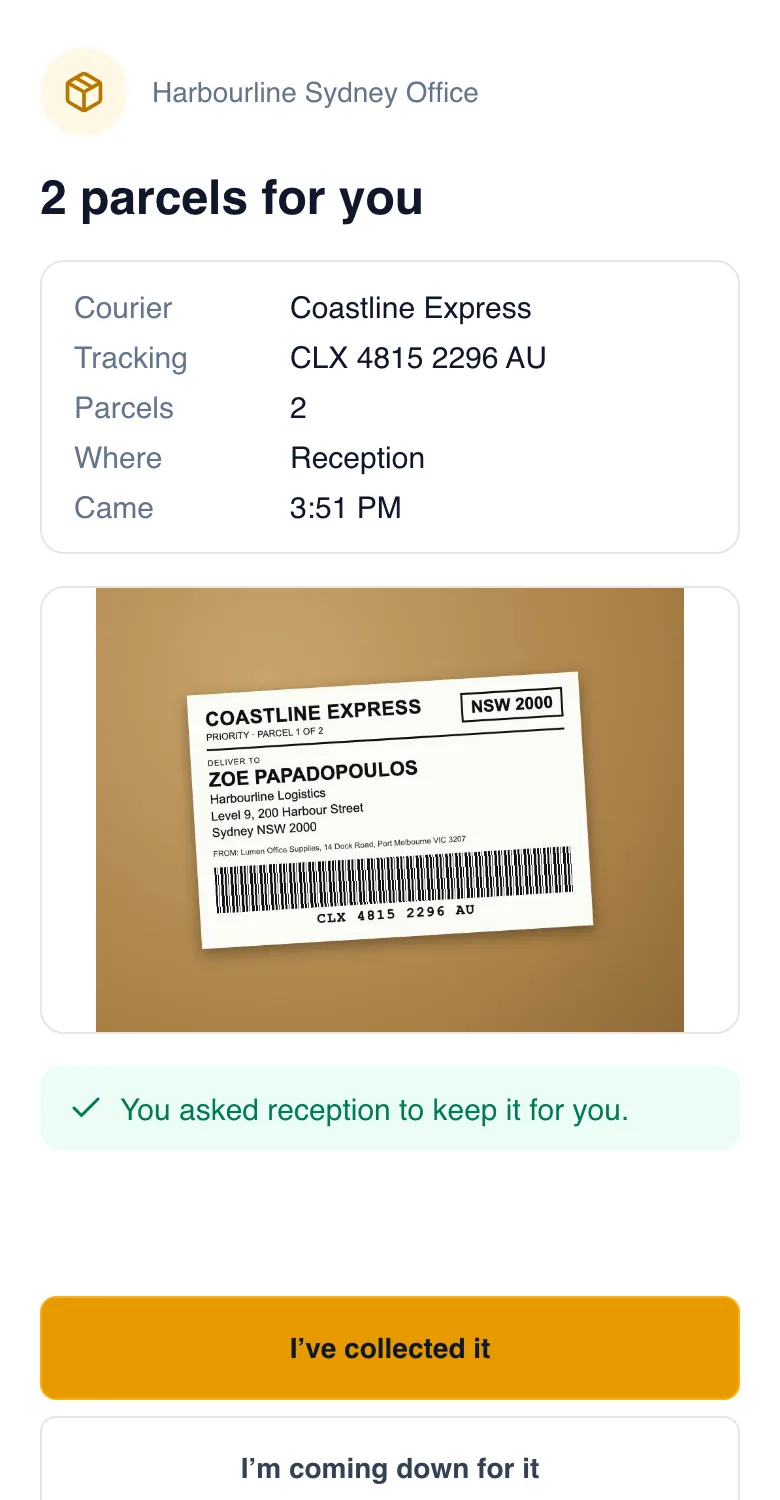
A courier brings two parcels to an office. These are the real screens the courier, Zoe and reception see.
- 1
The courier takes a photo of the label
GuestTrack reads who it’s for, the courier, the tracking number and the parcel count, and fills in the form. Typing still works, and nothing is held up if a photo can’t be read.
- 2
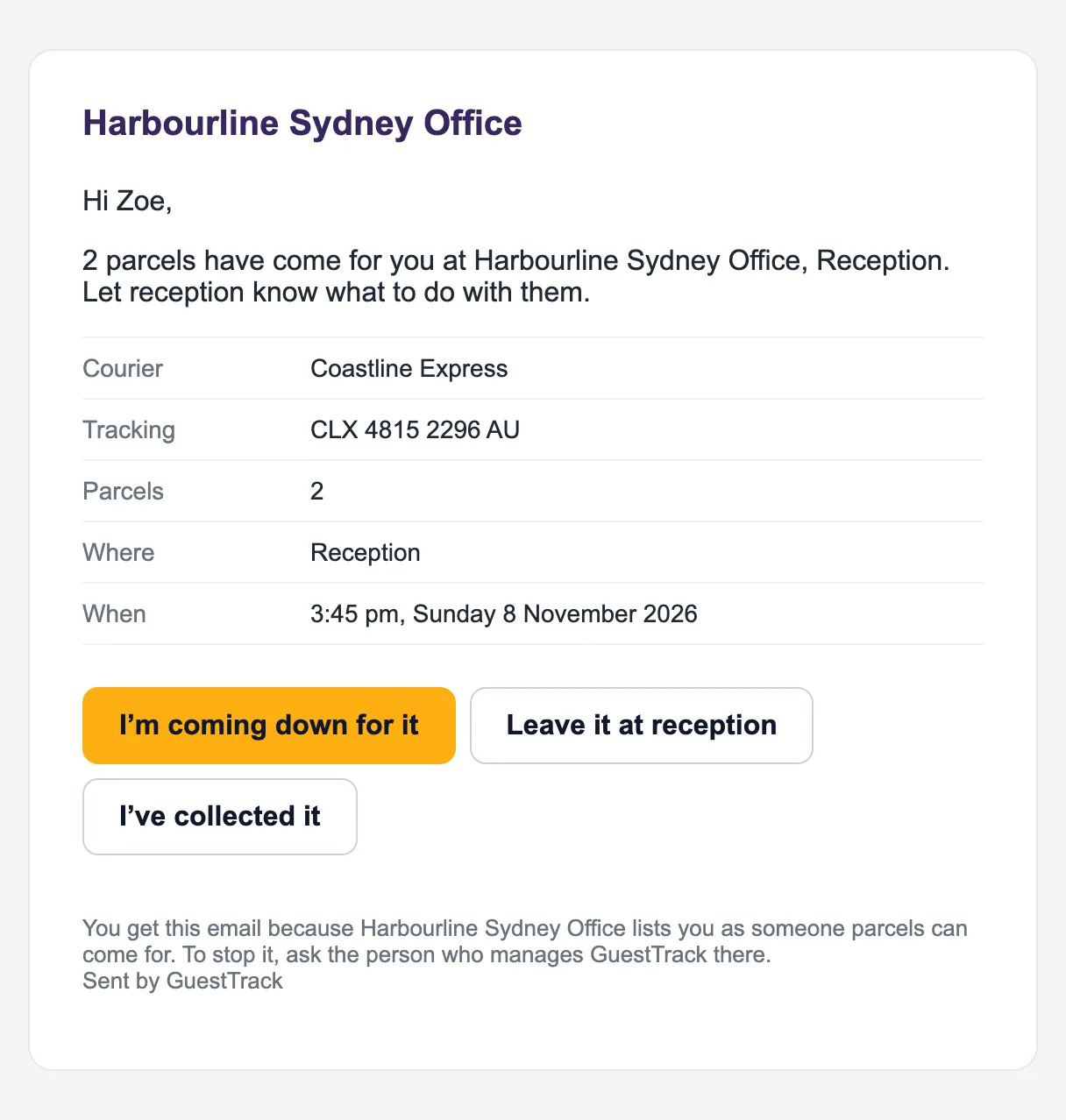
Zoe gets an email straight away
Where the parcels are, from which courier, with buttons. No sign-in. In Slack and in the GuestTrack app she gets the same buttons.
- 3
She answers with one tap
She’s in a meeting, so she taps Leave it at reception. She could also say she’s coming down, that someone else will collect it, or that it isn’t hers.
- 4
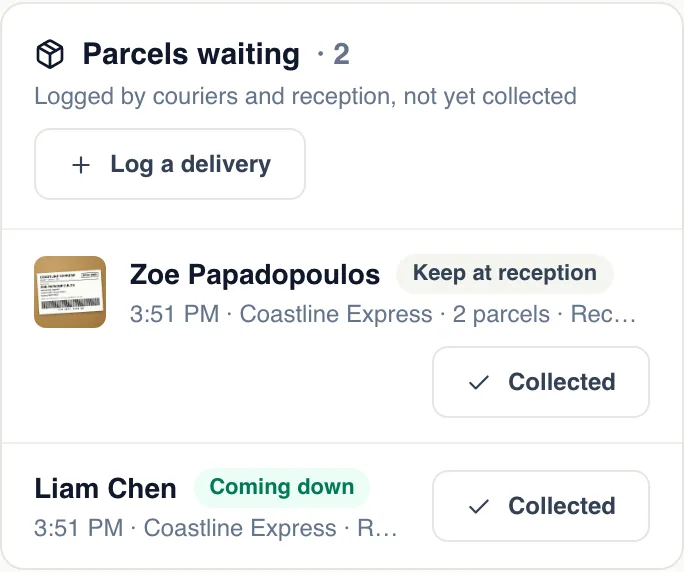
Reception sees it on Today
Parcels waiting lists every parcel with what each person said. When Zoe picks hers up, one tap: Collected.
Needs a signature
The courier waits, and the right person comes down
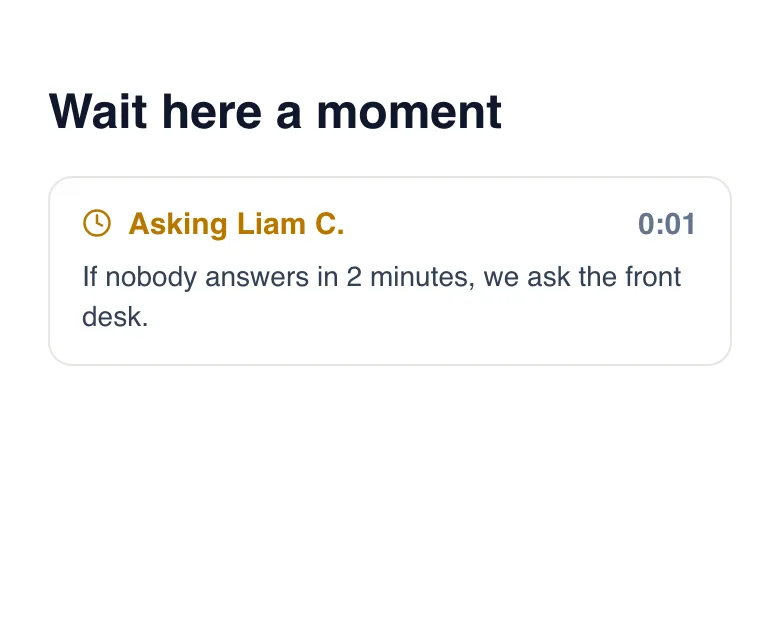
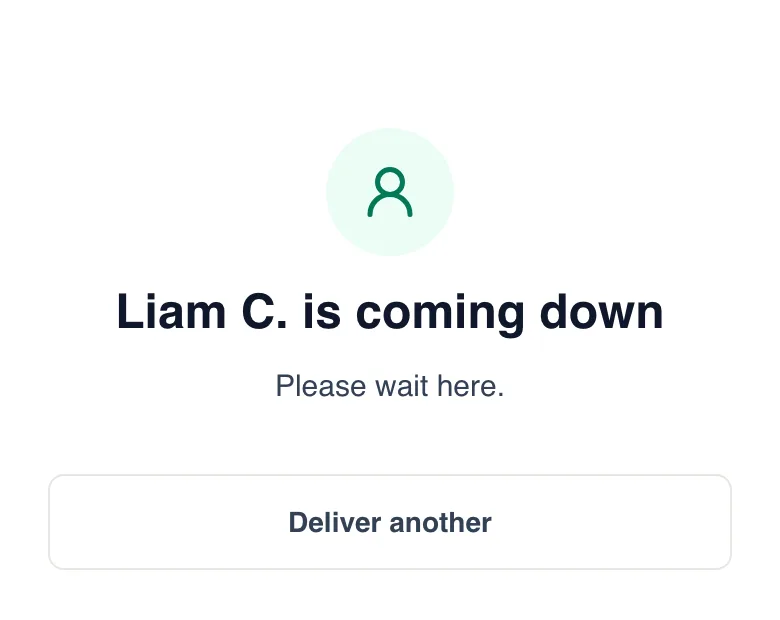
The courier picks Needs a signature. Their screen shows who is being asked, and for how long. Liam taps I'm coming down for it, and the courier knows within seconds. Nobody answers in two minutes? The front desk is asked to come and sign. A courier who can't wait taps “Leave it at reception”.
Nothing sits in the mail room for weeks
On Growth and Portfolio, and in the free trial.
- 9A parcel nobody collects is reminded of each weekday morning at 9, in your time zone.
- 3After three reminders, your General deliveries contacts hear about it too, once.
- 1Each reminder replaces yesterday’s notification on their phone, so it doesn’t fill up.
For everyone parcels come for
The people visitors can choose are always included. Tick an invite group, and its people can get parcels too.
Offices and reception desks
Everyone told the moment the courier leaves, without reception phoning around.
Apartment buildings
Residents from your residents’ list are told directly, and reminded until they collect.
Coworking spaces
Members pick up when it suits them. The front desk knows what has waited too long.
Schools and clubs
The office logs it, and the teacher or member is told.
At the front desk
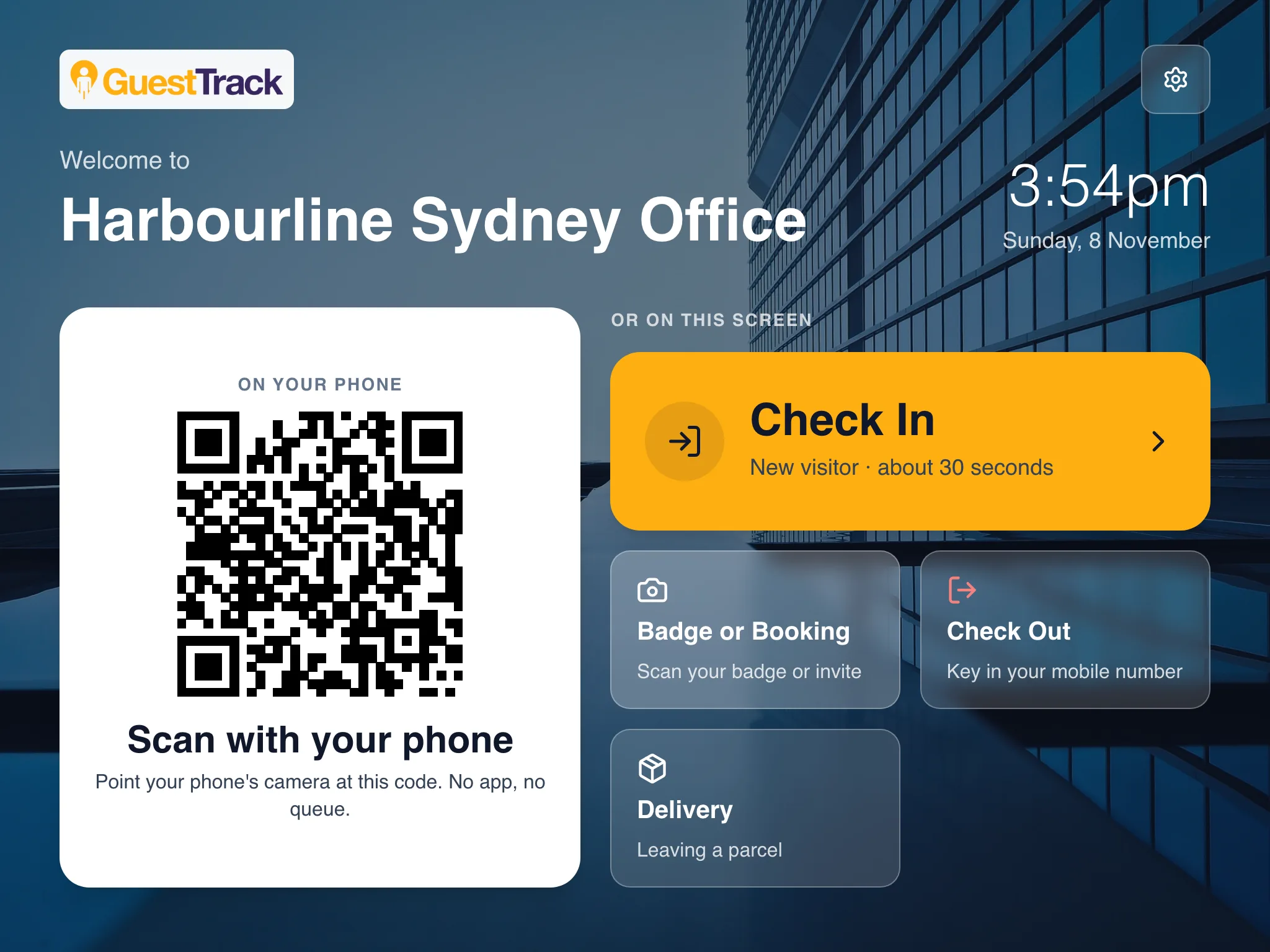
Today lists every parcel waiting, with the label photo and what each person said. A courier who hands parcels over at the desk is logged in seconds with Log a delivery, photo included. And a tablet running the Welcome Screen shows a Delivery button next to the visitor check-in.
Set it up in two minutes
- Add the people parcels come for to “Who are you visiting?”, each with an email (see Hosts).
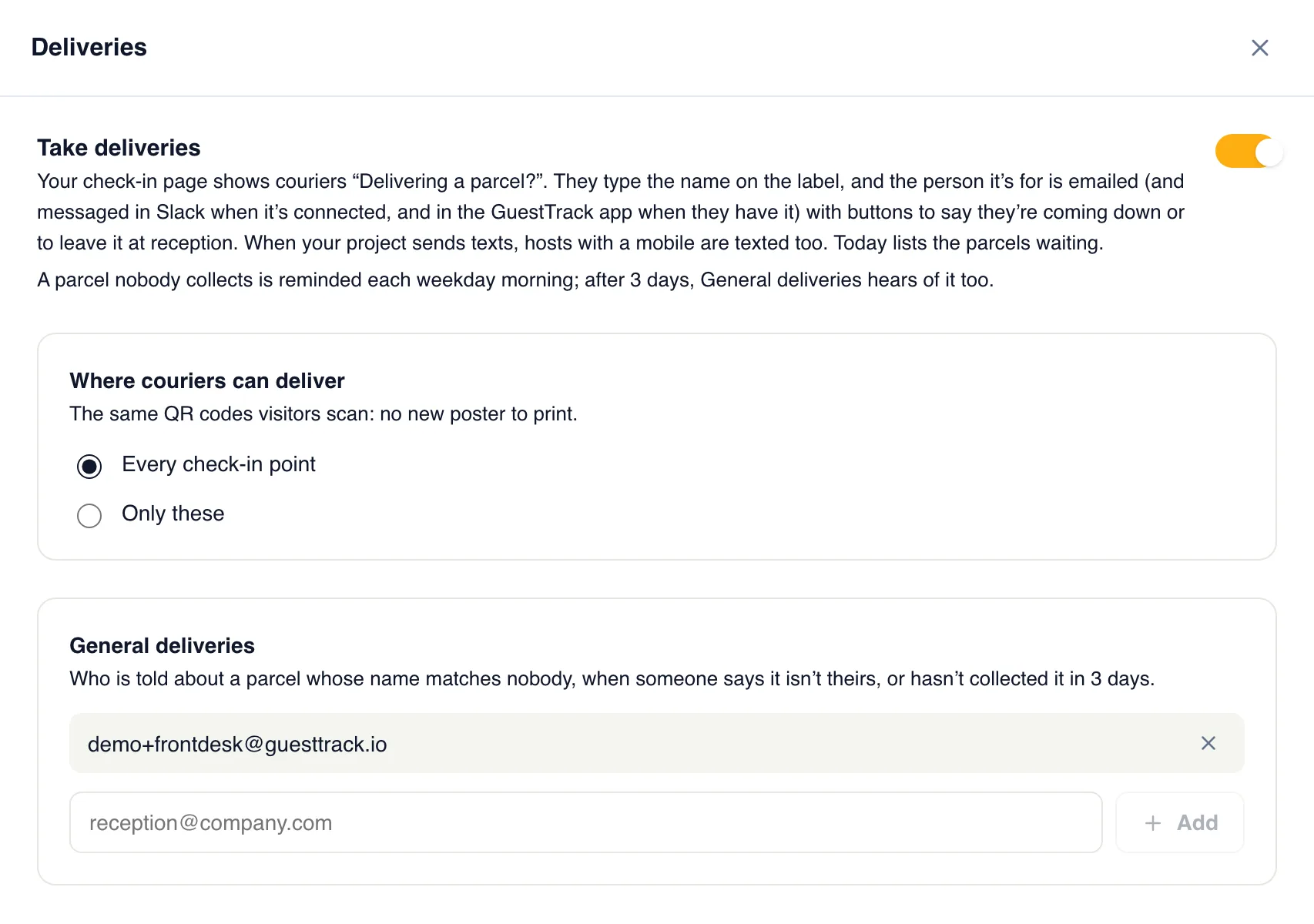
- In Check-in Setup, open Deliveries and turn on Take deliveries.
- Add your front desk under General deliveries, for a name that matches nobody. Save.
Private by design
- ✓The courier only sees “Zoe P.”, so the page can’t be used to list who works there.
- ✓Parcels never count as check-ins, and never show on your on-site or evacuation list.
- ✓Label photos are kept in Australia and deleted after 180 days.
Works with the tools you have
Slack and the GuestTrack app with the same buttons as the email. Texts through your own SMS account. The delivery.received and delivery.collected webhooks for your own systems. And “Which parcels are still waiting?” in Claude or ChatGPT.
Which plans include it
Starter and up: couriers log parcels, email, Slack and the GuestTrack app, Today and the Welcome Screen's Delivery button. Growth and Portfolio add the photo of the label, Needs a signature, weekday reminders, texts and webhooks. All of it is in the 14-day free trial.
Compare plansQuestions
- Does the courier need an app or an account?
- No. They scan the QR code at your door with their phone’s camera and tap Deliver. The people parcels are for don’t need an account either: they answer from the email.
- What if the name on the label matches nobody?
- Your General deliveries contacts are told, and anyone at the front desk picks the right person on Today. That person is then emailed as usual.
- What if the parcel isn’t theirs?
- They tap Not mine, and the front desk is told so they can find the right person.
- Can the courier see who works here?
- No. The courier only sees the first name and initial of the person who was told, like “Zoe P.”, so the page can’t be used to list your staff.
- Do parcels count towards my check-ins?
- No. Parcels are kept apart from visits: they don’t count towards your plan’s check-ins, and they never show on your on-site or evacuation list.
- What happens to the label photos?
- They are kept in Australia, shown only to the person the parcel is for and your front desk, and deleted after 180 days.
- Can reception log a parcel themselves?
- Yes. Log a delivery on Today takes the same photo of the label, for a courier who hands parcels over at the desk.