Contractor compliance
Know every contractor on site is licensed, insured and inducted.
And be able to show it later. Say which documents your contractors need. Each company and its workers upload them from a link, with no account or password. You check them, GuestTrack reminds them before anything expires, and anyone without a current document is stopped at check-in.
On the web, and in the GuestTrack app for iPhone, iPad and Android. On Growth and Portfolio, and in the free trial, with no charge per contractor.
How it works
Set up once. After that, most of the work is done by your contractors and by GuestTrack.
You
Say what you need
Public liability, workers’ compensation, a trade licence, an induction: from the company or from each worker.
They
Upload from a link
No account and no password. The company adds its own workers, and each worker gets a link too.
You
Check it
Open the document next to what they typed. Accept it, or send it back with a reason.
GuestTrack
Keeps it current
Reminds them 30 and 7 days before anything expires, and on the day. You don’t do the chasing.
At check-in
Stops who isn’t covered
Anyone without a current document is stopped, and your team sees exactly why.
Afterwards
Shows the proof
A register of who held what, as at any day, exported as a CSV.
1 · What you need
Say what you need, in plain words
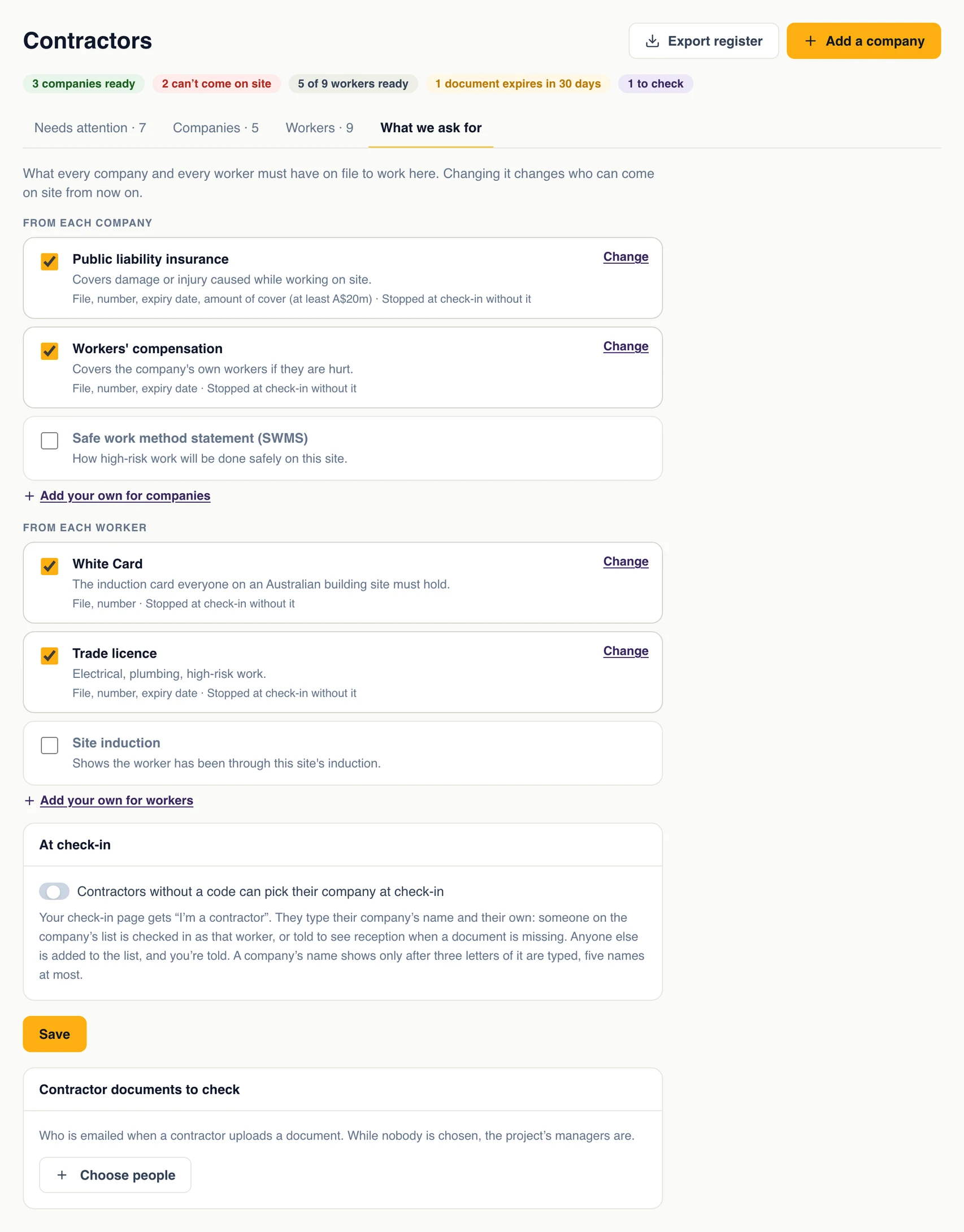
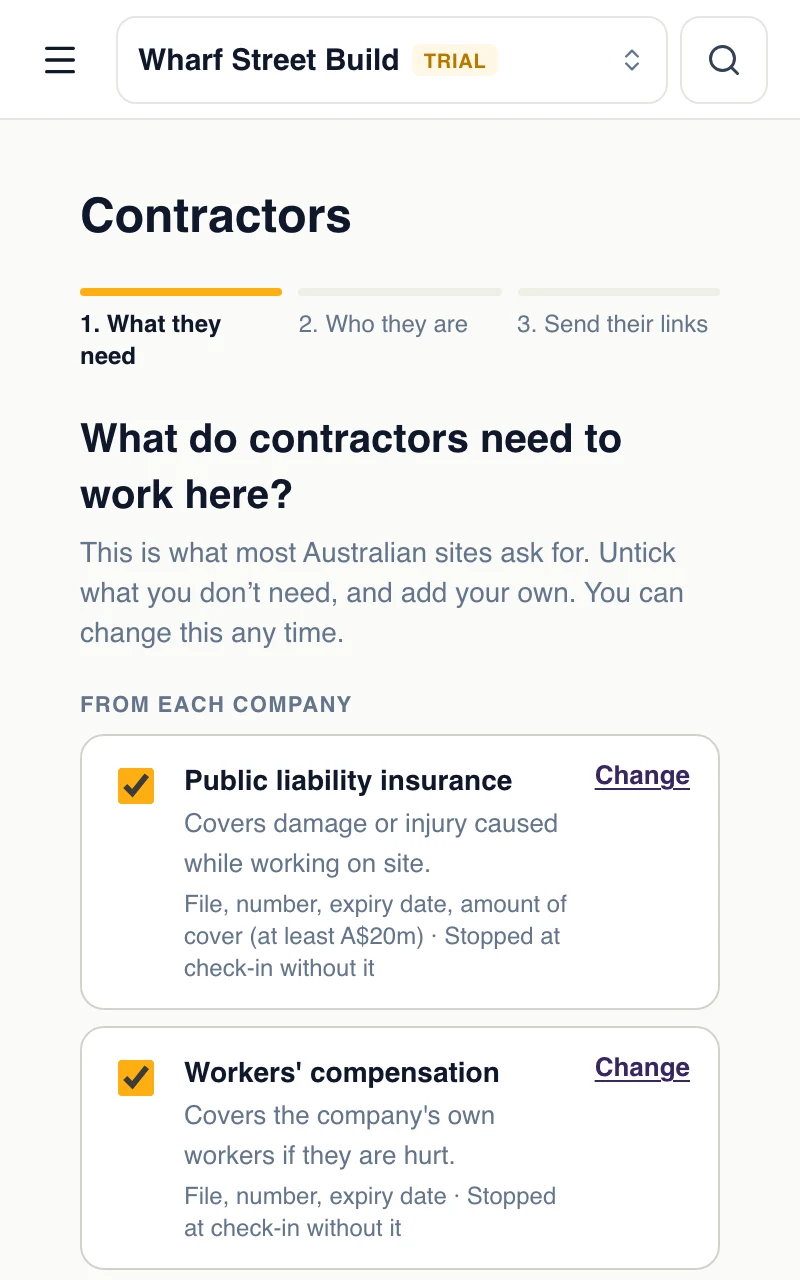
Start from a ready-made list for your country and change it: rename a document, add your own, ask for its number, its expiry date or a minimum amount of cover. Every document carries a line saying what it is, so a contractor who has never heard the name knows what to send.
In Australia the list includes the White Card: the card a worker is given after general construction induction training, which anyone doing construction work there must complete first.
One certificate covers the whole crew
Each document comes from the company or from the worker, and you choose what it stops.
From the company
Insurance and method statements that cover the whole crew. When one expires, every worker of that company is stopped until the new one is accepted.
From each worker
Their own licence or induction card. Only that worker is stopped when theirs is missing.
Stop, or only record
Choose for each document whether someone without it is stopped at check-in, or it is only shown on the register.
2 · Their link
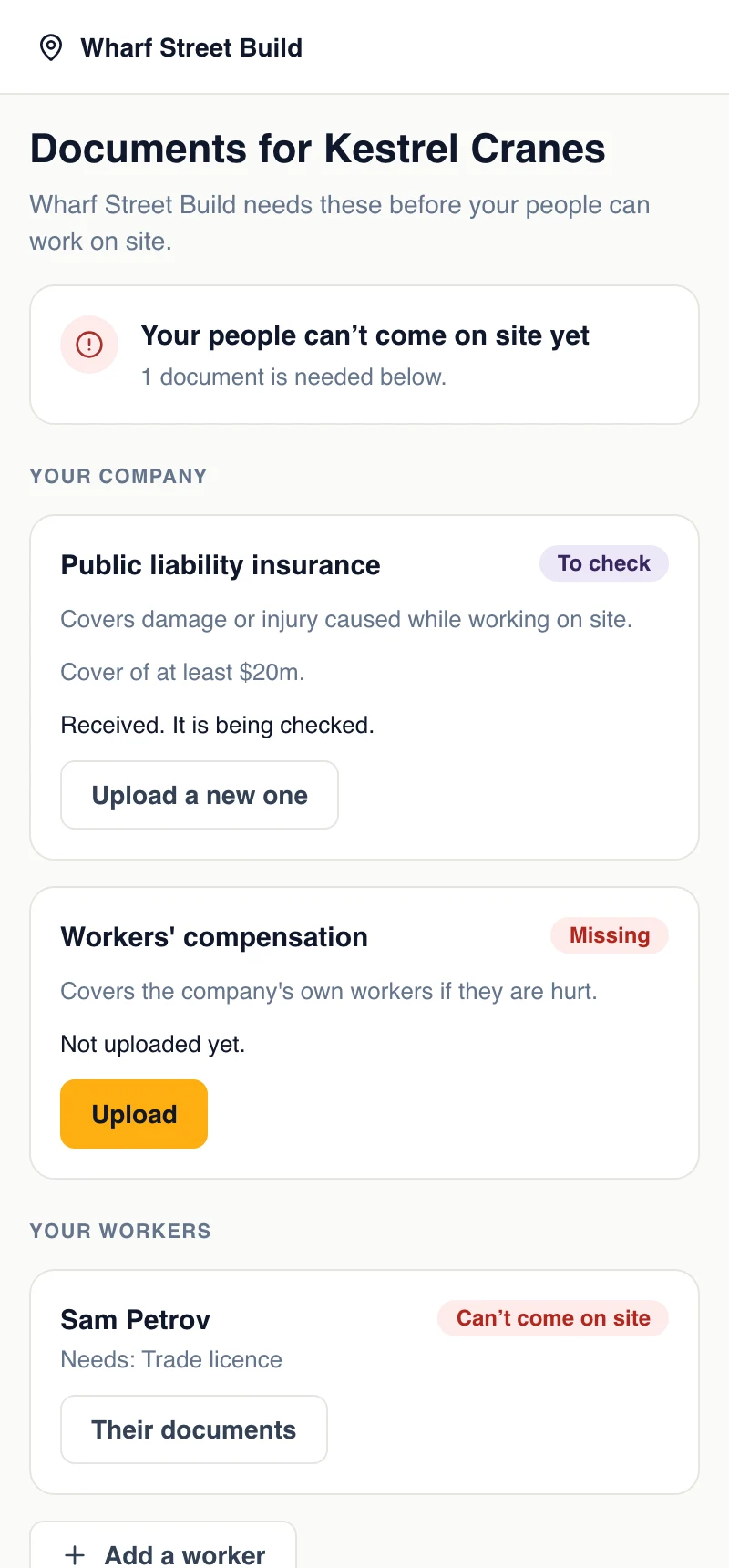
They upload from a link. No account, no password
Each company gets a link of its own. The person in their office who looks after paperwork opens it, sees what your site needs and what is still missing, and uploads a PDF or a photo. They add their own workers, and each worker gets a link for their own licence or card.
A file is never shown back on that page, so a link that is passed around gives nothing away. A lost link isn't a support call: the contractor asks for it again and it goes to the address you have on file.
Your side
Find any company's link in two taps
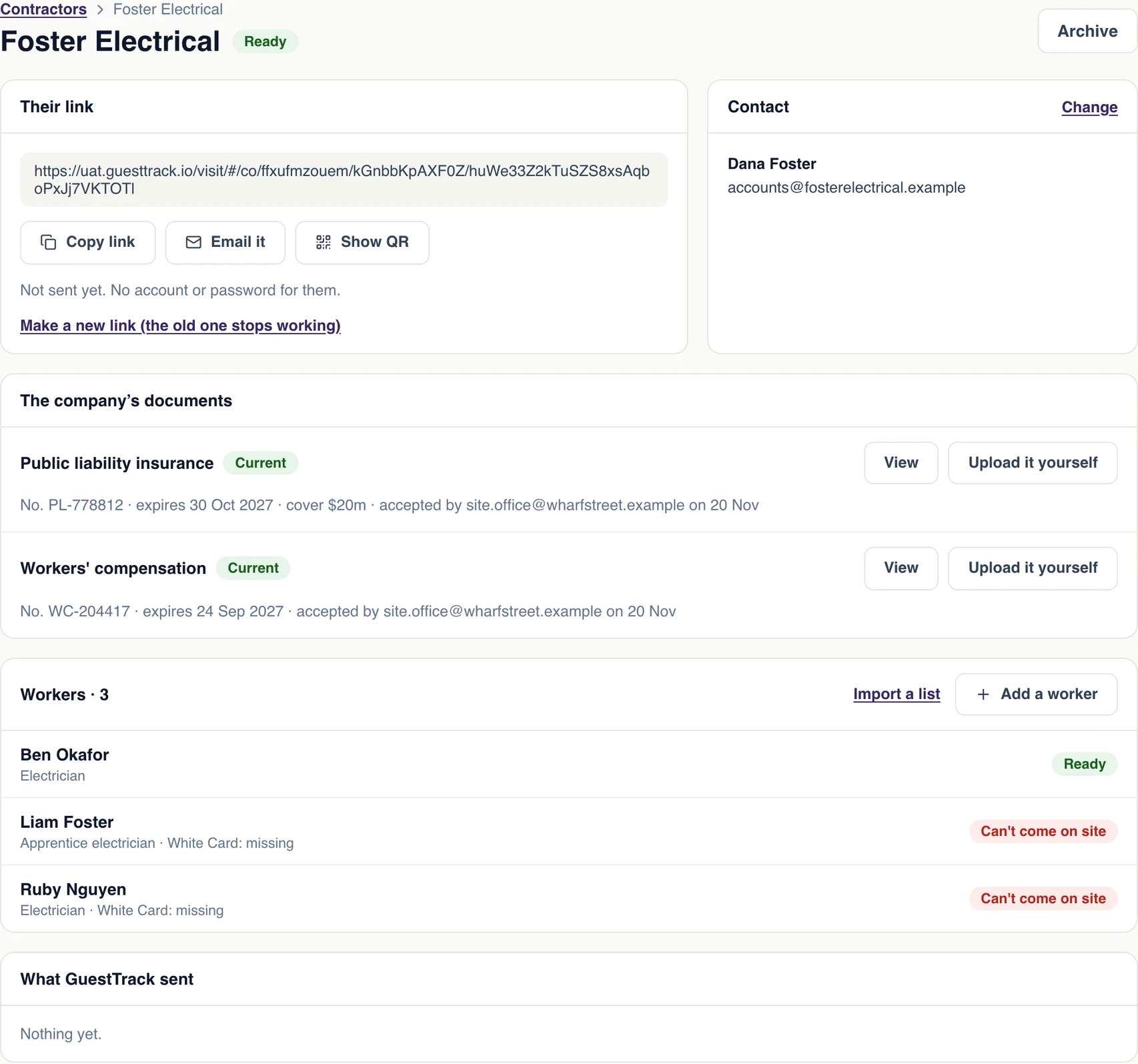
Contractors has its own place in the menu. Open a company and its link is at the top: copy it, email it again, or show it as a QR code. You see when it was sent, when it was opened and when it was last used, and under it everything GuestTrack has sent them.
If a link has gone to the wrong person, make a new one and the old one stops working at once. And when a contractor hands you a paper certificate, upload it yourself.
A big crew? Import its workers from a spreadsheet: name, email, mobile and trade. When a company or a worker finishes, archive them, and restore them when they come back.
3 · Check
Accept it, or send it back with a reason
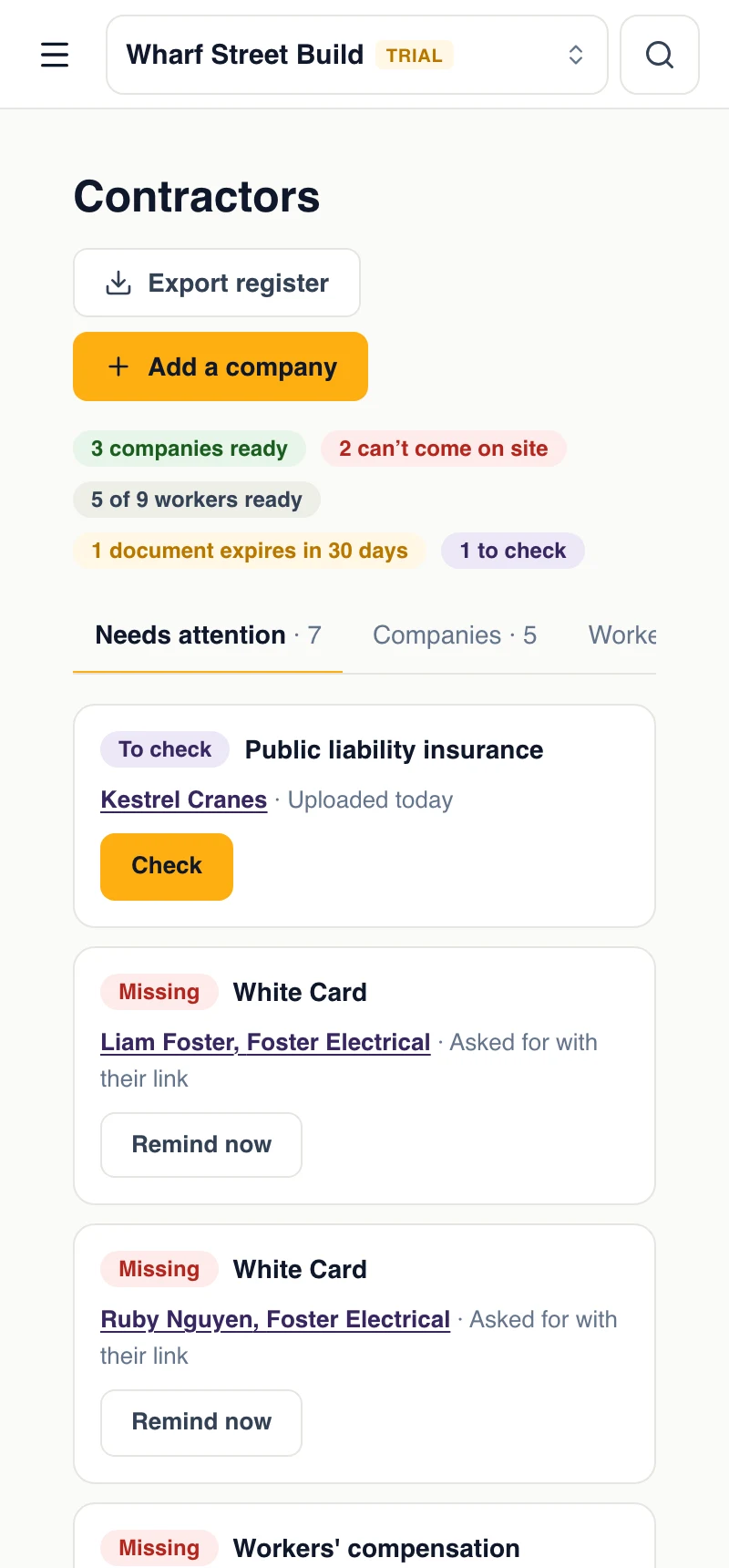
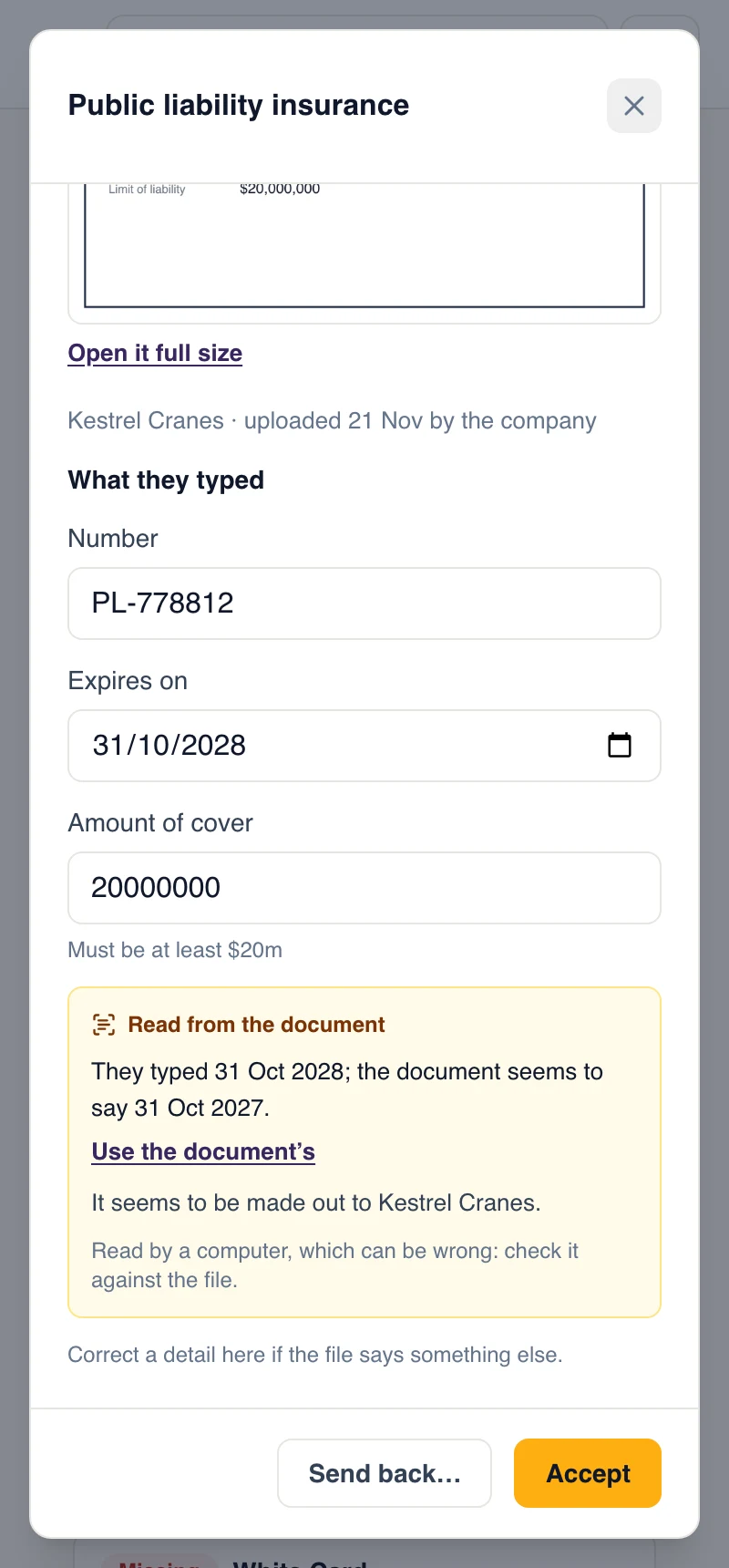
Everything a contractor uploads waits under Needs attention. Open the file next to the number, expiry date and cover they typed, correct anything they got wrong, and accept it. Or send it back: “Can't read it”, “Wrong document”, “Name doesn't match”, “Cover too low”. They are emailed the reason, your note and their link.
GuestTrack reads the number, expiry date and cover from the photo or PDF. It fills in what the contractor left empty, and when you check it shows where the document seems to differ from what they typed, such as a date a year out. It is a suggestion, and a computer can be wrong: a person still looks at every document and decides.
GuestTrack keeps who accepted each document and when. The document they already hold keeps counting while a new one waits.
4 · Reminders
GuestTrack does the chasing
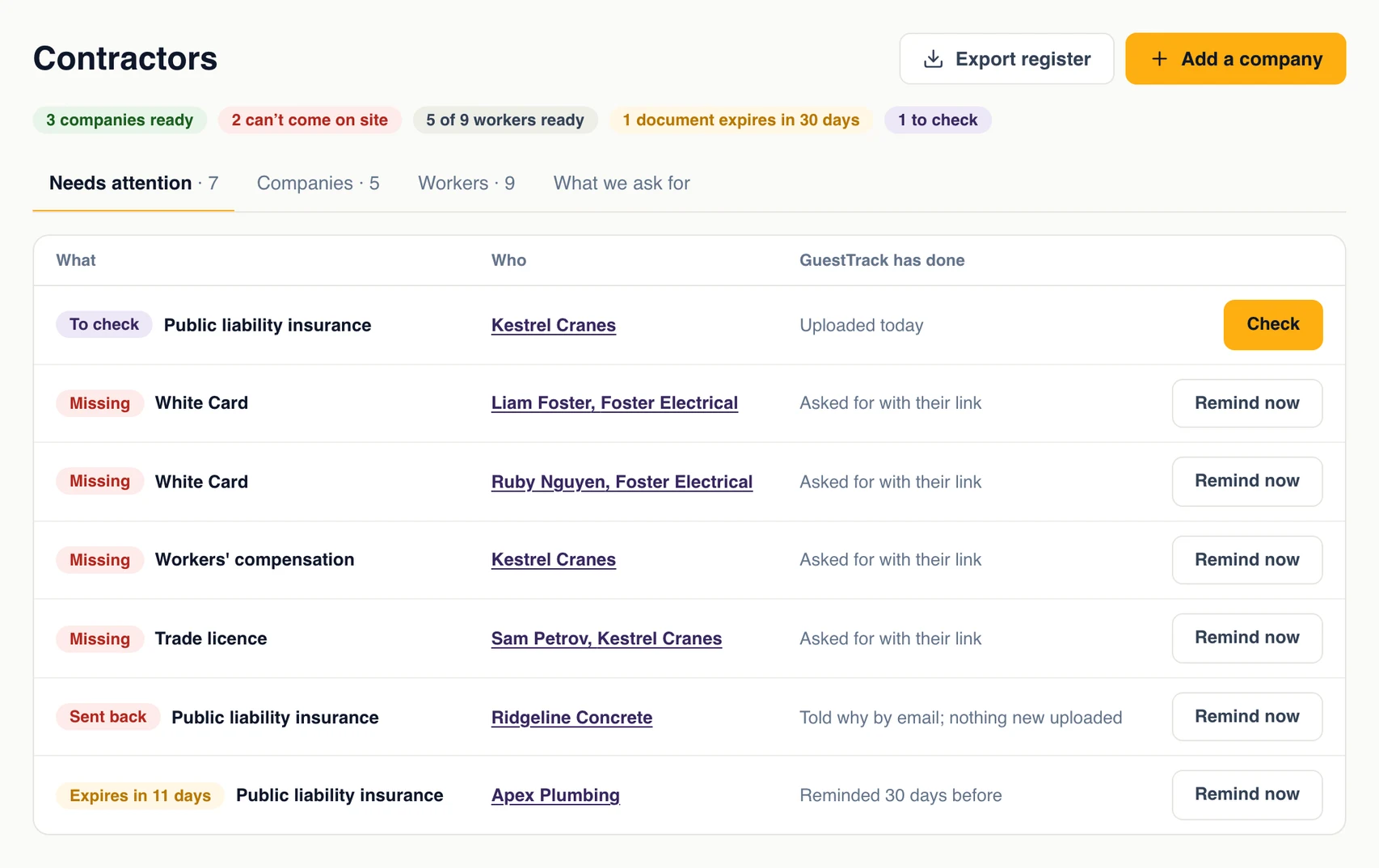
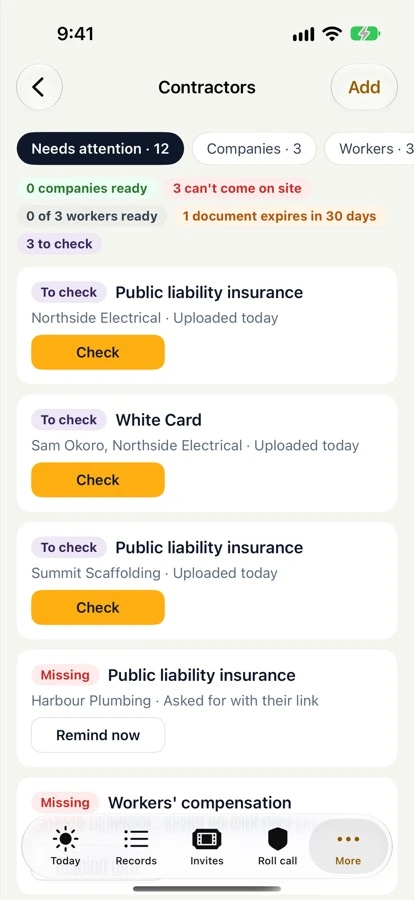
Contractors are emailed 30 days before a document expires, 7 days before, and on the day, each time with their link. Needs attention lists what is missing, expiring or waiting for you, and what GuestTrack has already done about it, with one button for each: Check, or Remind now.
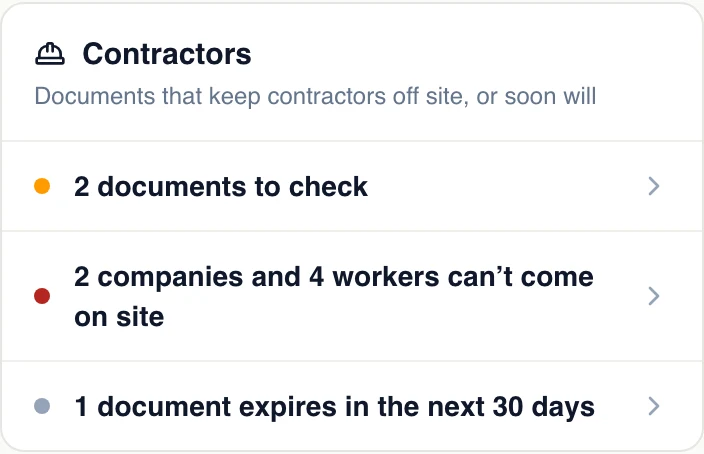
The people you choose are emailed when a document arrives to check, and Today carries a Contractors card: documents to check, who can't come on site, and what expires in the next 30 days.
5 · At check-in
No current document, no entry. And your team sees why
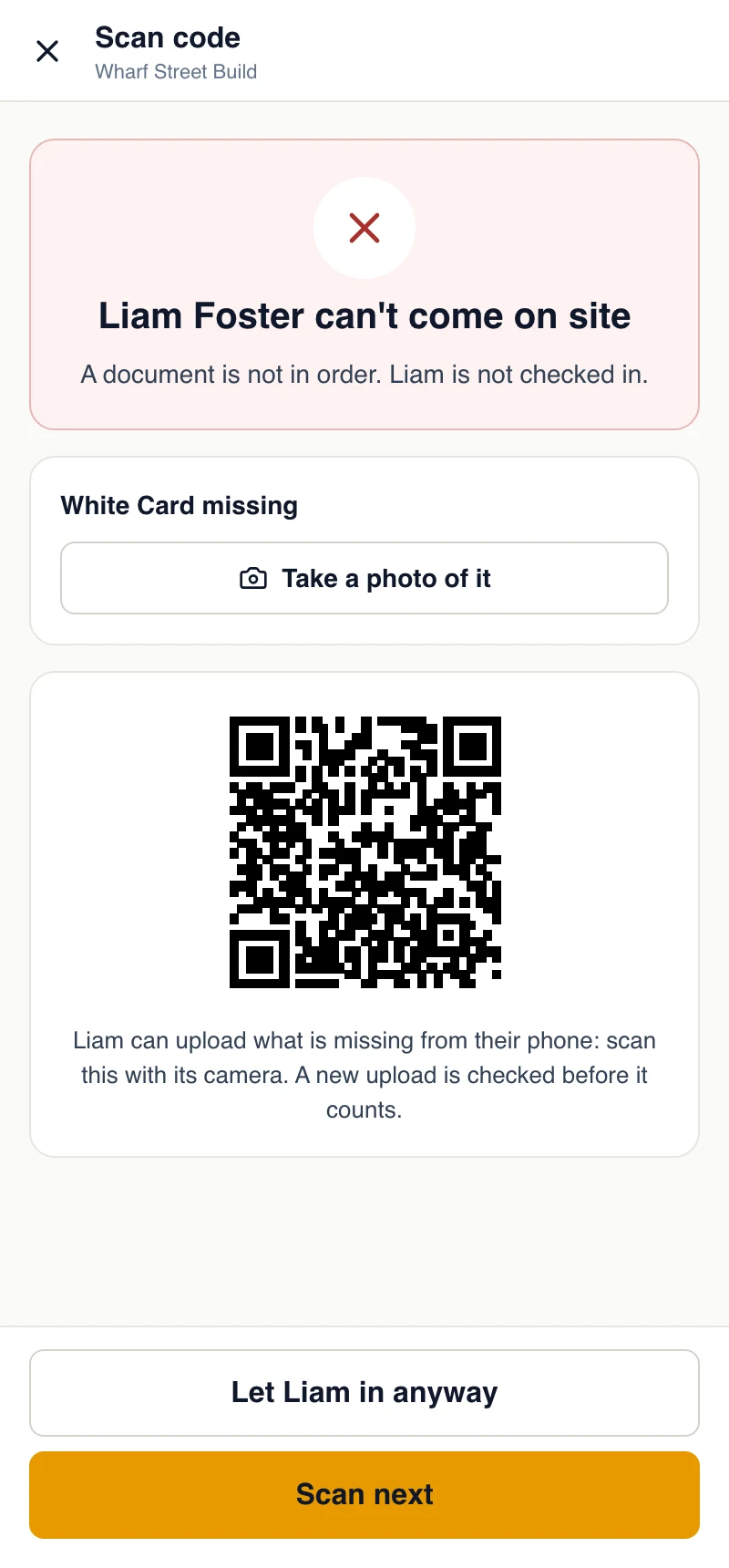
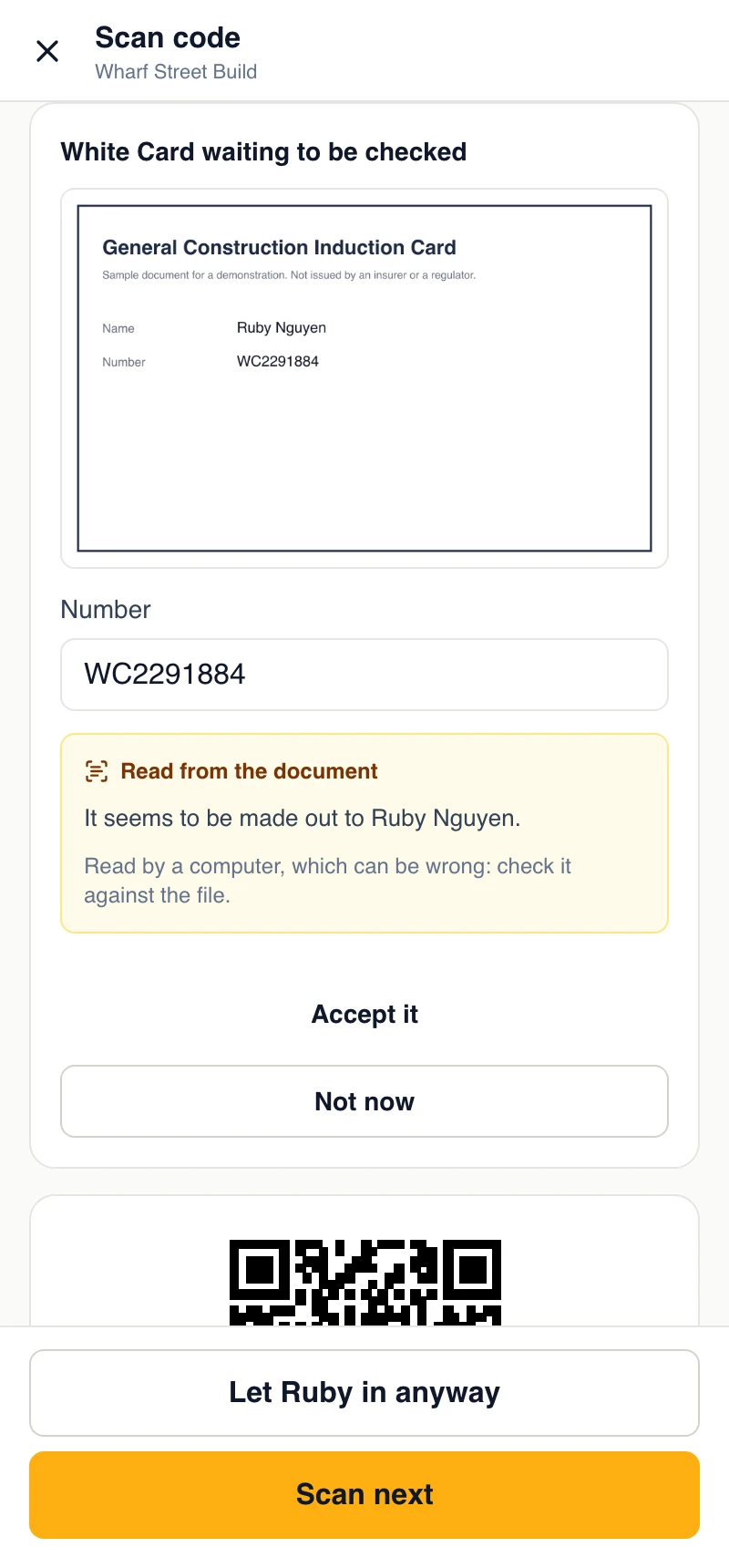
Workers check in with their own code. Anyone whose company or own document is missing, expired, sent back or still waiting to be checked is stopped, and whoever scans them sees each reason in words: “White Card missing”, “Public liability insurance expired 1 Nov”.
Most of the time it is sorted out on the spot. Whoever is at the gate takes a photo of the worker's card and it counts at once. Or the worker uploads it from their phone, from the QR code on the same screen, and the gate opens what they just sent and accepts it. Anything else waits for your team.
If you decide to let someone in anyway, that is kept on the visit with your name. A contractor who arrives without a code can pick their company on the check-in page, if you turn that on.
6 · Proof
The register: who was covered, on any day
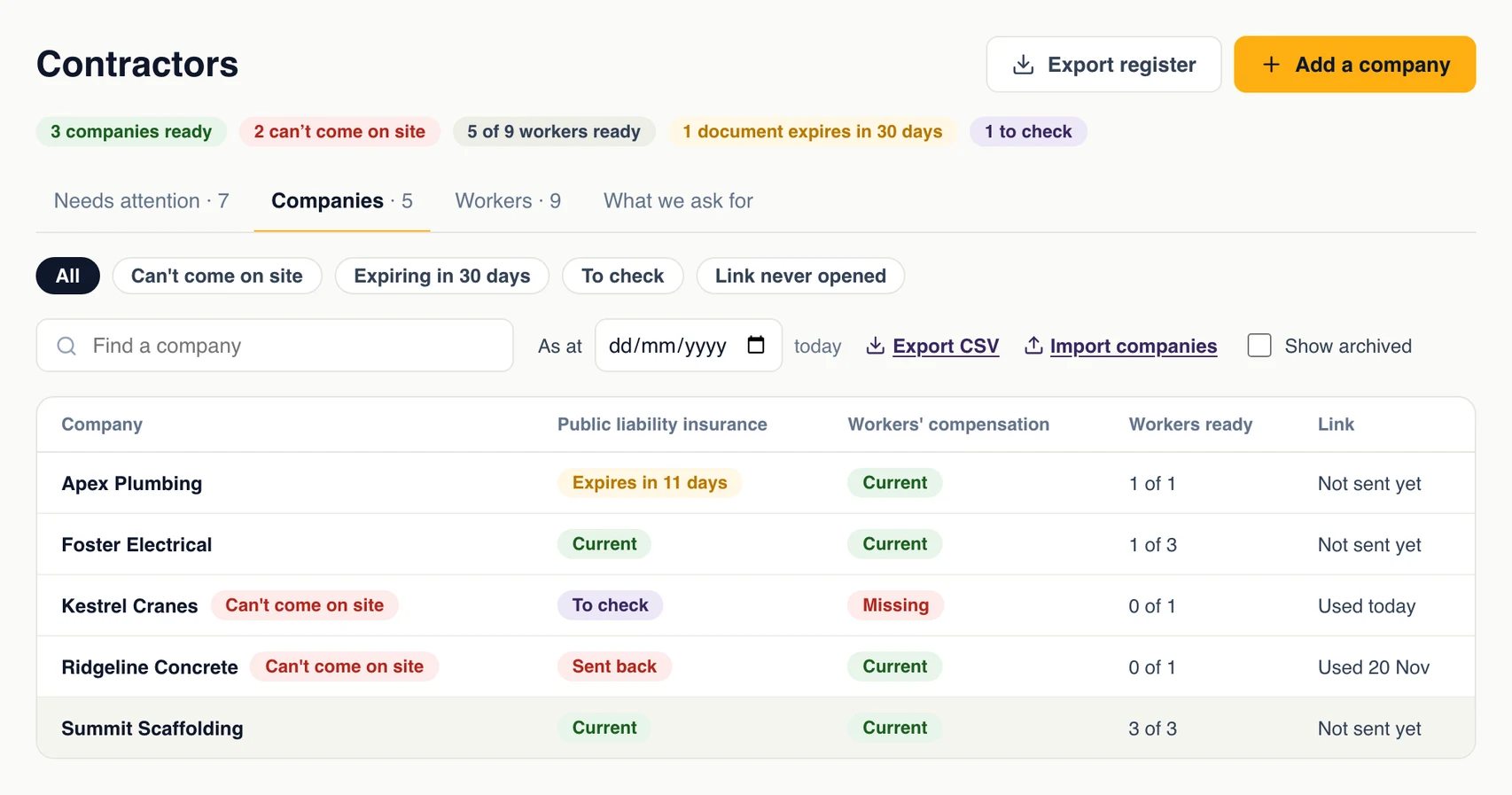
One table of every company and every document you ask for: current, expiring, expired, missing or waiting to be checked. Filter to who can't come on site, what expires in the next 30 days, or whose link was never opened.
Choose a date to see the register as at that day, and export it as a CSV for an audit, a client or your insurer. Earlier versions of a document are kept when a new one replaces them.
In the GuestTrack app
All of it from a phone or a tablet
The site office isn't always at a desk. Contractors is in the GuestTrack app on iPhone, iPad and Android phones and tablets: check a document and accept it or send it back, remind a company, add companies and workers, and open the register as at any day.
At the gate, Scan shows why a worker is stopped, takes the photo of their card with the device's camera, and accepts what they have just uploaded.


Wherever contractors come on site
In an organisation, a company's documents are kept once and count at every site that asks for them.
Construction sites
Subcontractors’ insurance, licences and induction cards, current before the crew walks through the gate.
Facilities and maintenance
The electricians, lift technicians and cleaners who come every month, each with a licence that expires.
Depots and warehouses
Carriers and labour hire: one certificate from the company covers every driver it sends.
Schools and care
Tradespeople who work around children or residents, with the checks your policy asks for.
Set it up yourself, in three steps
Contractors walks you through it the first time you open it.
What they need
Open Contractors in the menu. The ready-made list is ticked for you: untick what you don’t need, and add your own.
Who they are
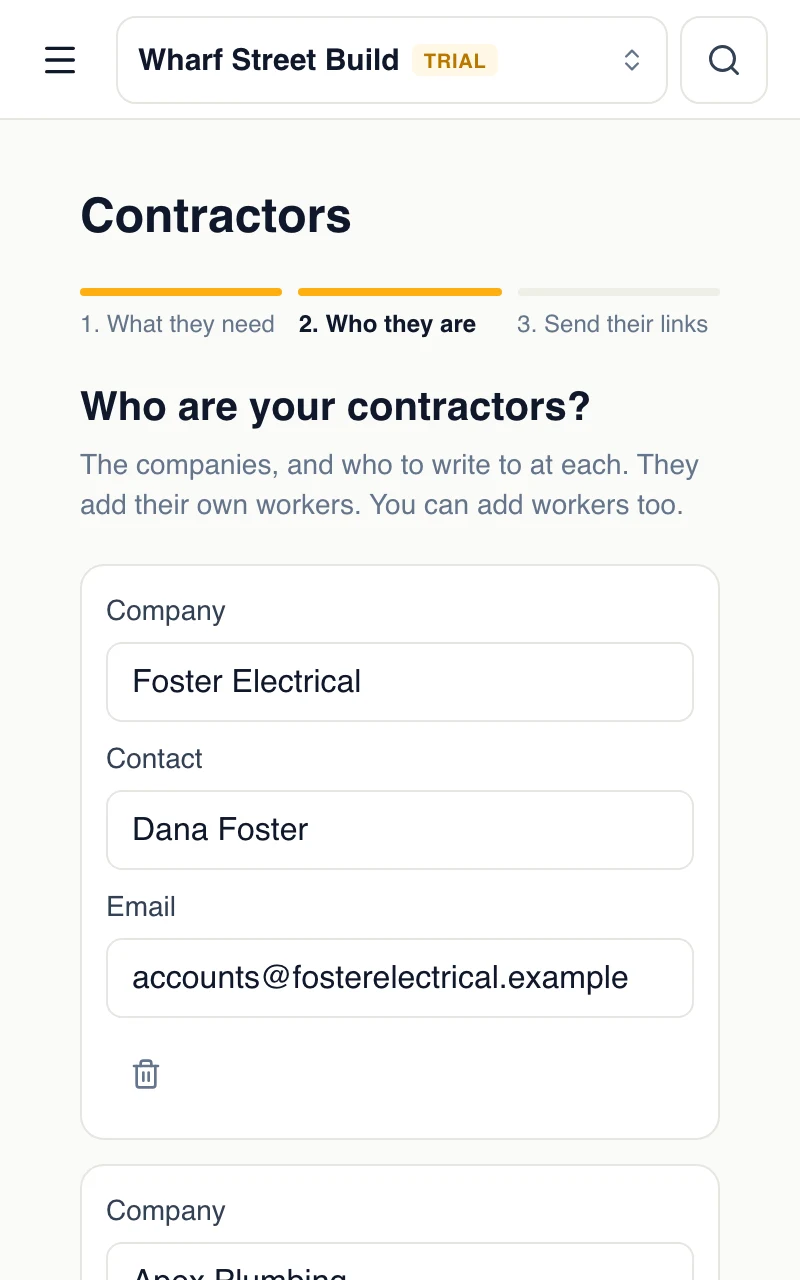
Add your contractor companies one by one, or paste a list from a spreadsheet: company, contact and email.
Send their links
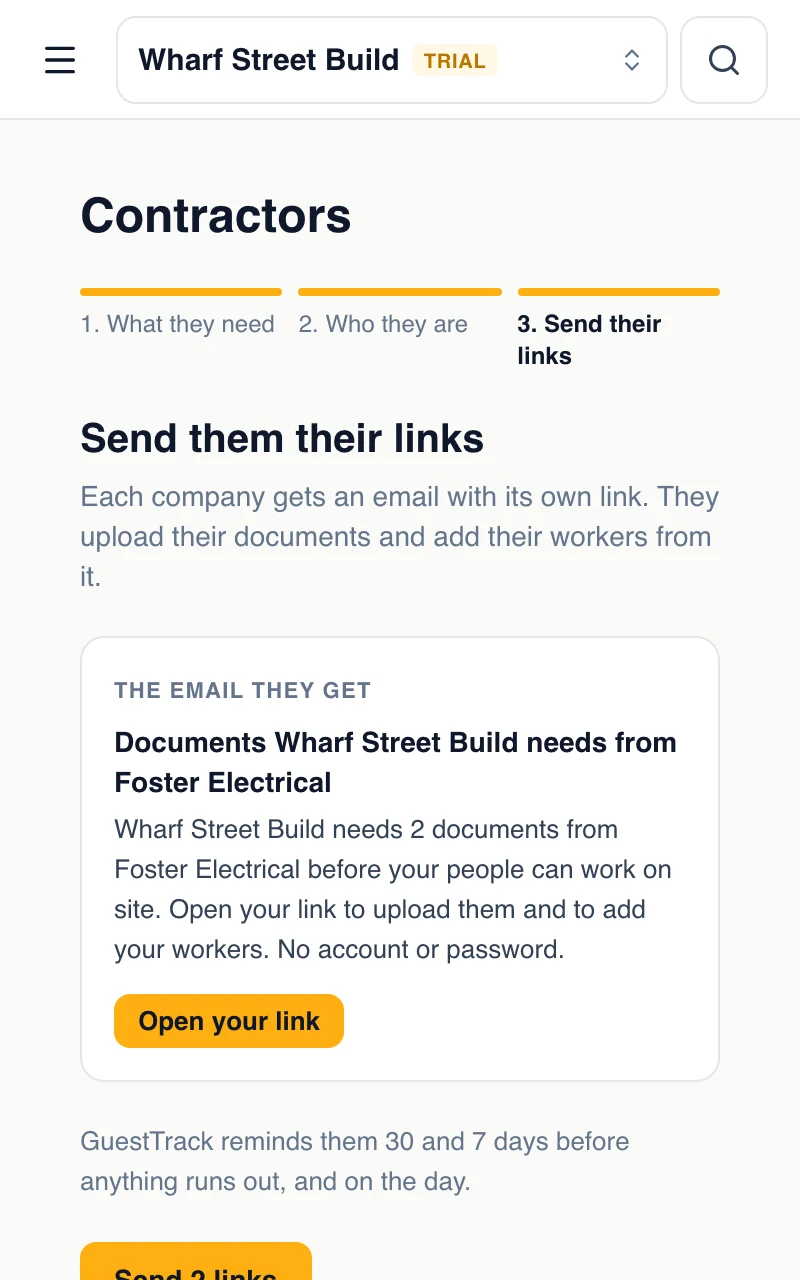
You read the email’s words first. Send the links now, or do it later from each company’s page.
Workers check in with the codes they are given, the same way invited visitors do.
Which plans include it
Included in Growth and Portfolio, and in the 14-day free trial. No charge per contractor.
Compare plansQuestions
- Do contractors need an account, a password or an app?
- No. Each company gets a link of its own, and each worker gets theirs. The link opens their page on any phone or computer, and that is all they need. Contractors never pay anything.
- What if a contractor loses their link?
- You can copy it or send it again from the company’s page at any time. A contractor who opens an old link can ask for the current one themselves: it is emailed to the address you have on file for them, and to nobody else.
- Which documents can we ask for?
- Any you like. Start from a ready-made list (public liability insurance, workers’ compensation, a trade licence, a site induction) and rename them or add your own. For each one, choose whether it comes from the company or from each worker, whether you want its number, its expiry date and the amount of cover, and whether someone without it is stopped at check-in.
- Does GuestTrack check that a licence or a certificate is genuine?
- No. GuestTrack collects the documents, shows them to your team, keeps who accepted each one and when, and acts on the expiry dates. It doesn’t look anything up in a government or insurer’s register. Someone on your team looks at each document and accepts it or sends it back.
- Does GuestTrack read the documents?
- Yes, as a help. It reads the number, the expiry date, the amount of cover and the name from the photo or PDF, fills in the boxes left empty, and shows your team where the document seems to differ from what was typed. A computer read it and can be wrong, so a person still checks each document and decides.
- What happens when a document expires?
- Whoever it belongs to is emailed 30 days before, 7 days before and on the day, each time with their link. After that day the worker, or for a company document every worker of that company, is stopped at check-in until a new one is accepted, or until someone on your team lets them in anyway, which is kept on the visit.
- What does a contractor see when they are stopped?
- On their own phone or a shared kiosk, only “Please see reception.” The reasons, such as “Public liability insurance expired 1 Nov”, are shown to your team, with the worker’s link as a QR code so they can upload what is missing on the spot.
- Can a document be accepted at the gate?
- Yes, in two cases. Whoever is checking people in can take a photo of the worker’s own card or licence, and it counts at once. And when a document was uploaded in the last 30 minutes, they can open it and accept it there. Anything else waits for your team, and nothing can be sent back from the gate.
- What if a worker turns up without their code?
- You can let contractors pick their company on your check-in page. It is off until you turn it on. They type the first letters of the company’s name and their own name: someone on the company’s list checks in as their code would, and someone new is added to the list and your team is told. If a document stops them they see “Please see reception.”
- We have several sites. Do contractors upload everything again?
- No. In an organisation, a company’s documents are kept once and count at every site that asks for the same thing. Each site can still ask for its own list.
- Can we show who was covered on a past day?
- Yes. The register can be shown as at any date and exported as a CSV: each company, each document, its number, its expiry and who accepted it. Earlier versions of a document are kept when a new one replaces them.
- Can we do this from a phone or a tablet?
- Yes. Contractors is in the GuestTrack app for iPhone, iPad and Android phones and tablets, under More: check a document, remind a company, add companies and workers, accept a document at the gate from Scan, and open the register. It also works in a phone’s browser.
- Which plans include it?
- Growth (A$49 a site a month with GST in Australia, US$35 elsewhere) and Portfolio, and the 14-day free trial. There is no add-on and no charge per contractor or per document.