Webhooks
Every check-in, sent where your team already works.
The moment a visitor checks in or out, GuestTrack posts it to Slack, to Zapier, Make or Power Automate, or to your own system. Who arrived, where, their company and who they came to see. No polling, nothing to export.
Set up in two minutes, with no code for Slack or no-code tools.

// POST to your URL, signed
{ "type": "visit.checked_in",
  "data": { "visit": {
    "visitor": { "name": "Priya Shah" },
    "qrCode": { "description": "Reception" },
    "checkedInAt": "2026-10-23T23:38:12Z" } } }
Watch it: a Slack channel, set up from scratch
A new channel and Slack app, the endpoint added in GuestTrack, then a visitor checks in and the channel says who arrived. Two and a half minutes.
How it works, in four steps
Two to set up once, then every visit is sent by itself.
You, once
Paste a URL
From Slack, Zapier, Make, Power Automate or your own server. GuestTrack sends a test straight away.
You, once
Choose what to send
Check-ins, check-outs, pre-registrations. Every check-in point, or only the loading dock.
The visitor
Checks in
By QR code, the Welcome Screen, the app or the API. Each is sent the same way.
Your system
Hears about it in seconds
A Slack message, a spreadsheet row, a door unlocked, an induction record.
Where people send it
Paste the URL. GuestTrack works out whether it’s Slack or a system that wants JSON.
- No code
A Slack channel
Paste a Slack incoming webhook URL. The channel gets one line a person reads, not raw data.
- The front desk sees who is arriving
- Security sees every check-in at the gate
- No code
Zapier, Make or Power Automate
Paste the “catch hook” URL they give you, then do anything they connect to.
- A row in Google Sheets or Excel
- A message in Microsoft Teams
- A contact in your CRM
- Signed JSON
Your own system
The same visit the GuestTrack API returns, signed with your endpoint’s secret.
- Access control and turnstiles
- HR and site induction registers
- Your data warehouse
From a pasted URL to “Priya is here”
The real screens from a Harbourline Logistics office.
- 1
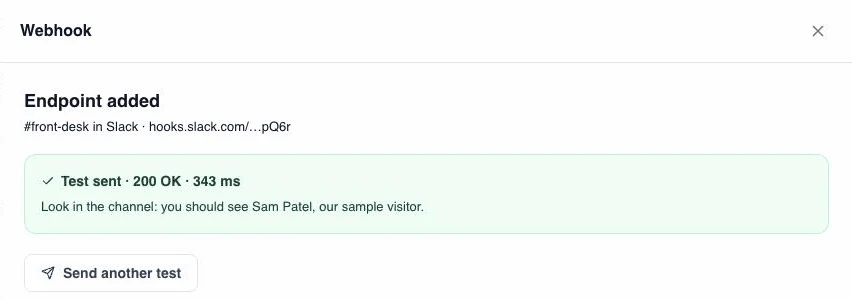
Add it, and see it work at once
Paste the URL and GuestTrack sees it’s Slack by itself. A test goes out straight away, with a made-up visitor, so you know it works before anyone arrives.
- 2
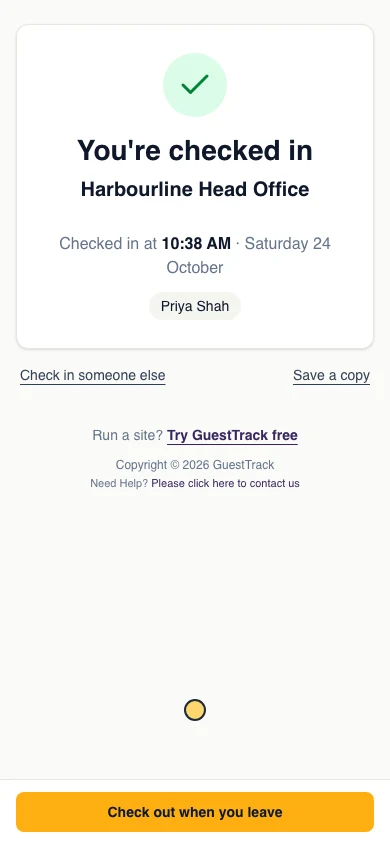
Priya scans the QR code at reception
She fills in the form and taps Check In, like every visitor. Nothing changes for her, and seconds later the front desk channel says she’s here.
- 3
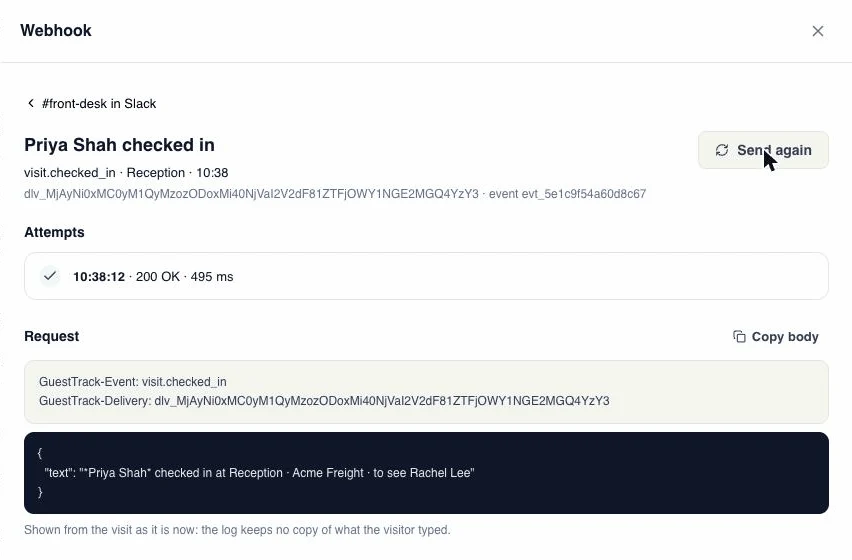
Every message, kept for 30 days
Each endpoint lists what it was sent. Open one to see exactly what went out, what your system answered and how long it took, and send it again with one click.
For developers
Signed, like Stripe’s
Each event is signed with your endpoint’s secret. Check it in a few lines, answer with a 2xx within 10 seconds, and do the slow work after. Each endpoint has its own secret; a new one works alongside the old for 24 hours, so you can change it without missing anything.
visit.checked_inA visitor checks in, pre-registered visitors included.visit.checked_outThey check out, or your staff check them out.visit.pre_registeredA booking made by your team or through the API.
Up to 5 endpoints a project. The visit has the same shape as the GuestTrack API’s.
import crypto from 'node:crypto'

// GuestTrack-Signature: t=1792813092,v1=5f1c…
const parts = header.split(',').map(part => part.split('='))
const t = Number(parts.find(([key]) => key === 't')[1])
const expected = crypto.createHmac('sha256', secret)
  .update(`${t}.${rawBody}`).digest('hex')

const ok = parts.some(([key, value]) => key === 'v1' && value === expected)
  && Math.abs(Date.now() / 1000 - t) < 300
If your system is down, nothing is lost
GuestTrack keeps trying, then tells you.
- 1 min
- 5 min
- 30 min
- 2 h
- 6 h
- 12 h
- 21 h
of retries for every message, 7 tries in all
- 24 h
failing, and the project’s owner gets an email
- 3 days
failing, and it pauses until you switch it back on
Questions
- What does Slack get?
- One line a person reads: the visitor’s name, their company, who they came to see and the check-in point. Nothing else from the form.
- What does my own system get?
- The visit as the GuestTrack API shows it, form answers included, in a JSON event signed with your endpoint’s secret.
- Which plans include it?
- Growth and Portfolio, and the 14-day free trial.
- Does it work with Microsoft Teams?
- Yes, through Power Automate: paste its “When an HTTP request is received” URL, then post the message to a Teams channel.
- Do I still need to poll the API?
- No. Webhooks send each visit as it happens. The API is still there to read the history.
- Are invites sent before the visitor arrives?
- A booking made by your team or through the API is sent as visit.pre_registered. In a project that uses Invites, the visit is sent when the visitor checks in.
- Is the URL safe?
- GuestTrack only sends to public https addresses, keeps each signing secret encrypted and shows it once. A Slack URL is itself the key to the channel, so the dashboard only shows its last few characters.